Wedding seating chart sign maker
Paste your guest list and get a seating chart sign at its real size, without filling in a template by hand: a print shop PDF, home printer sheets or a Cricut vinyl SVG, with an estimate of how far away guests can read the names. Your list never leaves your browser.
Loading fonts...
Loading fonts...
List check
Tables on the sign
Download
One page at the board size, plus 1/8 in bleed on each side. The letters are drawn shapes, so they print sharp at any size and no font file is embedded. Colors are set in CMYK.
The board at 100% across the sheets, with a 10 mm overlap, alignment marks, a sheet number and a 1 in ruler on each. Print at 100% (Actual size) and check that the ruler measures 1 in. Trim the right and bottom margin of each sheet along its dashed line and lay it over the next sheet so it just covers the gray strip and its red marks. To check the name size before you print the whole board, use the Test sheet.
One page with part of the header, a table heading and 8-12 names from your list, the longest included, at their final size and color, plus a 1 in ruler. Print at 100% (Actual size), tape it at eye level and step back to your distance.
Preview image. For printing, use a PDF.
Light letters would look empty in a file browser and on Design Space's white canvas, so the SVG files are black. The file color does not change the cut: pick your vinyl color in Design Space.
One SVG at the size of the board, each table (A-Z: each column) in its own group. Each name, table heading and header word is one welded path; no background.
Cut area from Cricut's Maker guides.
One compound path keeps the names of a piece in place on the mat. Untick it for one path per name.
The header comes off first, then the cuts follow the gaps between columns, then between rows, keeping each table with its guests (A-Z: each name with its table number) where they fit, never through a name. Each piece's position on the placement sheet is measured to the corner of its weeding box (or of its letters, when a neighbour is too close for a box). Calculated, not machine-tested.
The longest name at its final size: cut it first.
These are example names. Paste your list to make your own sign.
Your seating chart is ready.
Making place cards or a welcome sign next? Fonts from the library come with a commercial license, so they also work for stationery you sell. Trial terms: Creative Fabrica free trial checkout page · Last checked: November 12, 2026
Thousands of wedding fonts, with 10 downloads on a 30-day trial (it turns into a paid yearly plan after 30 days or at the 10th download, unless you cancel)
Some links here earn us a commission (details).
Your list never leaves your browser: the files are built on this page and nothing is uploaded. Only settings are remembered on this device, never the names.
What size seating chart sign do you need?
It depends on the number of guests, the layout and how far back the names have to be read. With the tool's defaults and names that reach 8 ft, 100 guests need a 22 x 28 board in either layout, and 200 guests need a 24 x 36 board in either layout (calculated). Paste your own list above and the Size check works it out for that list.
| Guests | A-Z by last name | By table, 8 per table |
|---|---|---|
| 50 | 16 x 20, portrait (9.5 ft) | 16 x 20, portrait (9.5 ft) |
| 75 | 18 x 24, landscape (8.5 ft) | 18 x 24, landscape (9.5 ft) |
| 100 | 22 x 28, landscape (8.5 ft) | 22 x 28, portrait (9 ft) |
| 125 | 24 x 36, landscape (9.5 ft) | 22 x 28, landscape (8.5 ft) |
| 150 | 24 x 36, landscape (8 ft) | 22 x 28, portrait (8 ft) |
| 200 | 24 x 36, portrait (8 ft) | 24 x 36, portrait (8.5 ft) |
| 250 | 24 x 48, landscape (8 ft) | 24 x 48, landscape (8.5 ft) |
| 300 | 36 x 48, portrait (9.5 ft) | 36 x 48, portrait (9.5 ft) |
Calculated with this tool's layout: Playfair Display 400 names, 1 in margins, a 16% header, longest name 21 letters, 8 guests per table in the by-table layout, read from 8 ft. Not measured on printed boards. Table headings in Great Vibes. A-Z lists of 100 guests or more get letter dividers, as in the tool. In parentheses: the distance the names reach on that size. Your own list may need a size up or down: paste it above.
For scale, The Knot's 2026 Real Weddings Study puts the average US wedding in 2025 at 117 guests, which needs a 22 x 28 board by table. Zola's survey of couples planning 2026 weddings averages 145 guests (plans, not head counts), which needs a 22 x 28 board by table (calculated). Sources: The Knot Worldwide: 2026 Real Weddings Study press release, Zola: The First Look Report 2026 · Last checked: November 15, 2026
Why 8 per table: Lifetime rates its 60 in round table for 8 chairs, and Party Rental Ltd. seats 8-10 guests at a 60 in round. Sources: Lifetime Products: How many chairs will fit around my Lifetime tables?, Party Rental Ltd.: Table Seating Guide · Last checked: November 15, 2026
How many names fit on each size
The other way round: the most guests each size holds with names that reach 6 and 8 ft (calculated). These are the sizes FedEx Office, Staples and Vistaprint list; which shop prints which is further down.
| Size (in) | A-Z, 6 ft | A-Z, 8 ft | By table, 6 ft | By table, 8 ft |
|---|---|---|---|---|
| 11 x 17 | 66 | 28 | 72 | 34 |
| 12 x 18 | 72 | 48 | 80 | 36 |
| 16 x 20 | 99 | 69 | 144 | 64 |
| 18 x 24 | 151 | 99 | 170 | 99 |
| 22 x 28 | 242 | 108 | 256 | 160 |
| 24 x 36 | 367 | 205 | 393 | 207 |
| 24 x 48 | 496 | 289 | 511 | 282 |
| 36 x 48 | 792 | 443 | 727 | 450 |
Calculated with this tool's layout: Playfair Display 400 names, 1 in margins, a 16% header, longest name 21 letters, 8 guests per table in the by-table layout, read from 6 and 8 ft. Not measured on printed boards. Table headings in Great Vibes. Each size in whichever orientation holds more. From 100 guests an A-Z list gets letter dividers, which take room, so some A-Z counts stop at 99.
Seating chart font size: how big should the names be?
The tool sizes the names with the Legibility Index of the United States Sign Council (USSC) Foundation: capital height in inches = farthest reading distance in feet / 30. The index stands for the farthest point a sign may be read from, and 30 is the average from test track research on outdoor business signs set in Helvetica and Clarendon. The USSC warns that the average may fall short for a particular sign. Names in all capitals need letters about 15% taller.
Source: USSC Foundation: Best Practice Standards for On-Premise Signs (PDF) · Last checked: November 15, 2026
| Farthest distance | Capital height | Playfair Display | Playfair Display, all capitals |
|---|---|---|---|
| 4 ft | 0.13 in (3.4 mm) | 14 pt | 16 pt |
| 6 ft | 0.20 in (5.1 mm) | 21 pt | 24 pt |
| 8 ft (default) | 0.27 in (6.8 mm) | 28 pt | 32 pt |
| 10 ft | 0.33 in (8.5 mm) | 34 pt | 39 pt |
Calculated: capital height = distance / 30, with Playfair Display capitals 0.708 of the point size tall. Sizes are rounded up to a whole point, so they still reach the distance after the tool rounds every distance down to half a foot.
Pick the back of the crowd, not the front. The tool starts at 8 ft; that is our default, not a rule. Leave some margin as well: in the driver studies the USSC cites, real traffic lowered the index by at least 35% on average, from 30 to about 20. Guests at a sign are not drivers, so the figure does not carry over, but a crowd, dim light or a shiny board all work against the letters. That is why the Size check says "calculated" and offers a Test sheet (PDF): one page with part of the header, a table heading and 8-12 names from your list, the longest included, at the final size and color, plus a 1 in ruler. Print it at 100% (Actual size), tape it at eye level and step back to your distance.
Source: USSC Foundation: Best Practice Standards for On-Premise Signs (PDF) · Last checked: November 15, 2026
ADA, for comparison. The 2010 ADA Standards ask permanent building signs for capitals at least 5/8 in tall when read from under 6 ft, plus 1/8 in for every foot beyond. At 8 ft that is 7/8 in, about 89 pt in Playfair Display and more than 3 times the USSC figure. Temporary signs, up for 7 days or less, are exempt, so the tool uses ADA only as a reference. Two of its sign rules still suit a seating chart: a non-glare finish with strong contrast, and no script, italic or highly decorative letters. That is why the names default to Playfair Display and the script goes in the header and the table headings. Script names are not rated: the USSC index was built on Helvetica and Clarendon letters.
Sources: U.S. Access Board: 2010 ADA Standards, Chapter 7 (703.5), U.S. Access Board: 2010 ADA Standards, Chapter 2 (216) · Last checked: November 15, 2026
By table or A-Z by last name?
By table gives each table a block: its heading, then its guests. The tool tries 1 to 12 columns of blocks and keeps the one with the largest names. Tables go in number order (2 before 10) or in the order of your list, with the head table first if you like.
A-Z by last name gives every guest one line with the table number right after the name, filled column by column, so each guest looks up their own name. From 100 guests the tool adds letter dividers (A, B, C...), and the "Last, First" display puts the last name where the eye lands first. The last name is the last word, without Jr., Sr., II, III or IV, and lowercase particles stay with it: Maria de la Cruz sorts as de la Cruz. For two-word last names, use a Last name column or "Last, First".
Which layout gives larger names depends on the list: by table loses room when tables differ in size, A-Z gives up width to a table number on every line. On your board the Size check says when the other layout makes the names 10% larger or more (calculated). One long entry also sets the size of every name, so the tool names the longest one and how much larger all names get if you shorten it; "Put couples on two lines" splits couples at "&" or "and".
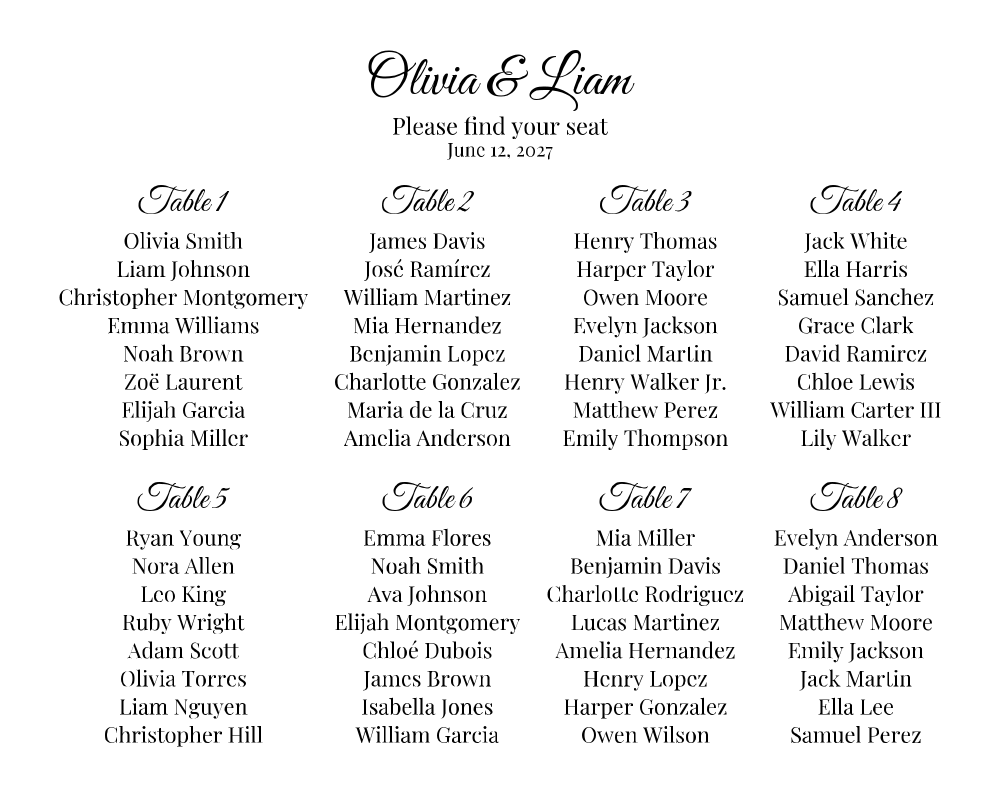
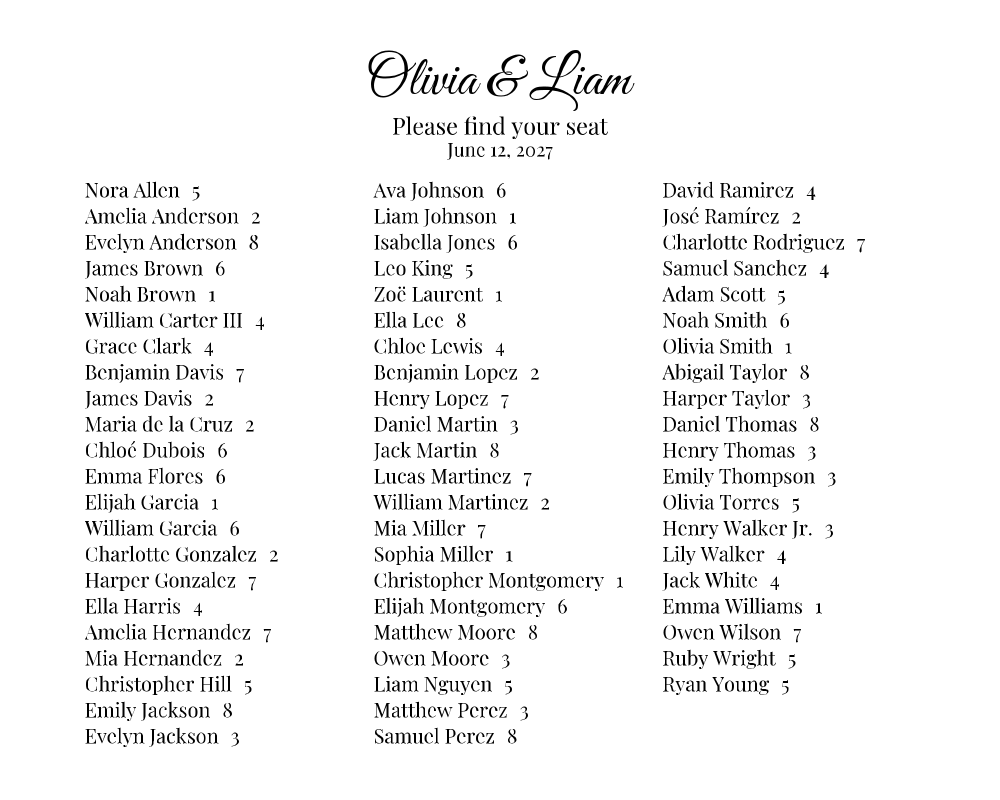
Both drawn at build time with the tool's own layout code and default fonts, header and margin.
Printing it: print shop or home printer
Auto in the Board menu picks the smallest of these sizes that reaches your distance, and the Size check names the shops that list it. From each shop's own pages:
| Size (in) | FedEx Office | Staples | Vistaprint |
|---|---|---|---|
| 11 x 17 | not listed | not listed | paper poster or foam board |
| 12 x 18 | not listed | paper poster or foam board | not listed |
| 16 x 20 | paper poster | paper poster | paper poster or foam board |
| 18 x 24 | paper poster or foam board | paper poster | paper poster or foam board |
| 22 x 28 | paper poster or foam board | not listed | paper poster or foam board |
| 24 x 36 | paper poster or foam board | paper poster | paper poster or foam board |
| 24 x 48 | not listed | not listed | foam board |
| 36 x 48 | paper poster or foam board | paper poster or foam board | paper poster |
Staples foam board comes in five sizes from 12 x 18 to 36 x 48 in, which its page does not list one by one, so only those two are marked. It is delivery only, 5-7 business days after printing; eligible Staples paper posters can be picked up the same day, except 36 x 48. The FedEx Office poster page also offers foam board mounting, and its mounted poster product starts at 18 x 24; the Staples poster page offers foam board mounting too. Sources: FedEx Office: Custom poster printing, FedEx Office: Mounted poster printing, Staples: Custom poster printing, Staples: Custom foam board printing, Vistaprint: Foam Board Wedding Signs, Vistaprint: Poster sizes guide · Last checked: November 15, 2026
Print shop PDF. One page at the board's size. The letters are drawn shapes, so no font file goes to the shop, and the 300 DPI that FedEx Office, Staples and Vistaprint ask for applies to photos and other images, not to them. Colors are set in CMYK (black is 0/0/0/100), as FedEx Office and Staples recommend; Gold-tone and Kraft-tone print as flat colors. FedEx Office prefers PDF, up to 150 MB per file. For bleed, FedEx Office asks for at least 1/8 in on every side of a poster and Vistaprint for at least 0.125 in, so the PDF adds 1/8 in by default (tick "Exact board size, no bleed" to leave it off). Staples asks to keep text inside the safe area: the tool's margin is 1 in unless you change it, and a frame stays on the margin line.
Sources: FedEx Office: Online printing FAQ, Staples: Custom foam board printing (FAQ), Vistaprint: Poster sizes guide · Last checked: November 15, 2026
Outdoors. None of the three shops suggests these boards for bad weather. FedEx Office says its foam board backing is not waterproof and may warp in rain or high humidity, and points to banners and yard signs for outdoor displays. Staples, even for laminated posters and foam board: "we don’t recommend using them outside". Vistaprint says its foam board wedding signs are neither water nor wind resistant.
Sources: FedEx Office: Mounted poster printing, Staples: Custom foam board printing (FAQ), Vistaprint: Foam Board Wedding Signs · Last checked: November 15, 2026
Home printer PDF. It splits the board over Letter or A4 sheets at 100% scale, with a 10 mm overlap, alignment marks, a sheet number and a 1 in ruler on each sheet. A 24 x 36 board takes 16 Letter sheets or as many A4 sheets (calculated). Print at 100% (Actual size) and check that the ruler measures 1 in. Then trim the right and bottom margin of each sheet along its dashed line, lay it over the next sheet so it just covers the gray strip and its red marks, and tape the sheets together: the gray and the marks end up underneath.
What size mirror for a seating chart?
Measure the glass you can see, inside the frame, enter it under Custom size and keep a margin of 1 in or more from the frame. The Size check then shows how far the names reach on that mirror. For a first idea, here is how many guests fit on a few glass sizes with names that reach 8 ft:
| Visible glass | A-Z by last name | By table, 8 per table |
|---|---|---|
| 24 x 36 in | 205 | 207 |
| 30 x 40 in | 296 | 291 |
| 36 x 48 in | 443 | 450 |
| 22 x 65 in | 341 | 320 |
Example sizes, not standard ones, each in whichever orientation holds more. Calculated with this tool's layout: Playfair Display 400 names, 1 in margins, a 16% header, longest name 21 letters, 8 guests per table in the by-table layout, read from 8 ft. Not measured on printed boards. Table headings in Great Vibes.
Reading a mirror. Glass reflects the room behind the guests. ADA sign rules ask for a non-glare finish and strong contrast, and the advisory notes that glare and uneven backgrounds make letters harder to read for people with low vision. Try the sign on the Mirror background in the preview, then check it on the real glass where it will stand.
Source: U.S. Access Board: 2010 ADA Standards, Chapter 7 (703.5) · Last checked: November 15, 2026
Vinyl that comes off. Cricut says Premium Vinyl Removable stays removable for up to 2 years without residue; it is cut on a mat. For long strips without a mat there is Smart Vinyl Removable, for which Cricut gives no such figure. Clean the glass with rubbing alcohol and let it dry before you apply the names, as Cricut's Transfer Tape instructions say. If the mirror is rented, ask the rental company too.
Sources: Cricut Help Center: Cricut Vinyl, Cricut Help Center: All About Smart Materials, Cricut Help Center: Transfer Tape Instructions · Last checked: November 15, 2026
Clear acrylic or frame glass? Lay the home printer sheets under it as a guide and letter the names by hand. For one large word on top, such as the couple's last name, the cursive SVG generator welds a script name into one piece.
Cricut seating chart: cutting the names in vinyl
Design Space does not take PDF files, so the vinyl file is an SVG. An uploaded SVG keeps the size saved in it and arrives as cut lines, and an SVG with more than 5,000 paths fails to upload. Each name, table heading and header word is one path, so 300 guests by table come to about 350 paths with the header (calculated).
Source: Cricut Help Center: How to upload images into Design Space · Last checked: November 12, 2026
Whole board is one SVG at the size of the sign, each table (A-Z: each column) in its own group. Pieces that fit your cut area takes the header off first, then splits the board along the gaps between columns, then between rows, keeping each table with its guests where the cut area allows, and never cuts through a name; a header line wider than the cut area is split between its words, and a word that is still too wide gets a warning. Each piece comes as one compound path inside a weeding box, so its names keep their places on the mat, and the Placement sheet (PDF) gives each piece's position on the board, measured to the corner of its weeding box (or of its letters, for a piece too close to its neighbour for a box). All of this is calculated, not machine-tested.
| Cut area in the tool | Pieces fit within | Material |
|---|---|---|
| 12 x 24 mat | 11.5 x 23.5 in | Vinyl on the mat |
| 12 x 12 mat | 11.5 x 11.5 in | Vinyl on the mat |
| Smart Vinyl, Explore 3/4 or Maker 3/4 | 11.7 in wide, up to 12 ft long | Smart Vinyl only, no mat |
| Smart Vinyl, Explore 5 or Maker 5 | 12 in wide, up to 12 ft long | Smart Vinyl only, no mat |
| Venture, 24 x 28 mat | 23.5 x 27.5 in | Vinyl on the mat |
| Venture, 25 in Smart Materials | 24 in wide, up to 12 ft long | Smart Vinyl only, no mat |
| Joy Xtra mat | 8.25 x 11.75 in | Vinyl on the mat |
The 12 x 12 and 12 x 24 mat areas come from Cricut's Maker guides; the Explore guides do not give them. Premium Vinyl goes on a mat. Sources: Cricut Help Center: Cricut Maker 3 Quick Start Guide, Cricut Help Center: Cricut Maker 5 specifications and requirements, Cricut Help Center: All About Smart Materials, Cricut Help Center: Cricut Explore 5 Quick Start Guide, Cricut blog: Introducing Cricut Explore 5, Cricut Help Center: Cricut Venture Quick Start Guide, Cricut Help Center: Cricut Joy Xtra Quick Start Guide · Last checked: November 12, 2026
- Attach. If you switch to one path per name, Design Space places the shapes as close together as it can on the mat (material saver mode). Select everything in the piece and click Attach to keep it as laid out. Source: Cricut Help Center: How to use Attach in Design Space · Last checked: November 15, 2026
- Long strips of Smart Vinyl. Smart Vinyl has to be at least 6 in long to feed without a mat, so cut short pieces from the roll, or put an offcut shorter than 6 in on a Standard Grip mat (a Performance Mat on a Venture); on an Explore or Maker leave 10 in of space behind the machine. Cricut suggests cutting a long design into smaller sections before you apply Transfer Tape. Sources: Cricut Help Center: Smart Vinyl, Cricut Help Center: All About Smart Materials · Last checked: November 15, 2026
- Thin strokes. The tool measures the thinnest stroke of the longest name and the longest table heading at their final size (calculated, not machine-tested). Under 0.5 mm, our own caution line and not a Cricut figure, it works the stroke out again with Playfair Display Bold and with Inter for the names or table headings, and suggests a bolder font only when its thinnest stroke comes out clearly thicker (at least 1.2 times), with that value: in the tool's calculation the hairlines of Playfair Display barely thicken in bold, while Inter's strokes are much thicker. Cut the Test name SVG, the longest name at its final size, before the whole board.
Another cutting machine? Enter its area under Custom cut area. Font formats compatibility lists which apps open SVG and which need DXF.
Fonts on the sign
The names default to Playfair Display, a serif with clear capitals, and the couple's names in the header (line 1) and the table headings to Great Vibes; the name size section explains why the script stays out of the names. Every built-in font allows commercial use, so signs you sell are fine. Each license name below links to the license file next to the font on this site.
| Font | Style | Guest names | License |
|---|---|---|---|
| Playfair Display (regular and bold) Default for guest names and header lines 2 and 3 | Serif | Rated | SIL Open Font License 1.1 |
| Inter | Sans serif | Rated | SIL Open Font License 1.1 |
| Great Vibes Default for table headings and header line 1 | Script | Not rated | SIL Open Font License 1.1 |
| Allura | Script | Not rated | SIL Open Font License 1.1 |
| Parisienne | Script | Not rated | SIL Open Font License 1.1 |
| Sacramento | Script | Not rated | SIL Open Font License 1.1 |
| Dancing Script | Script | Not rated | SIL Open Font License 1.1 |
| Satisfy | Script | Not rated | Apache License 2.0 |
| Yellowtail | Script | Not rated | Apache License 2.0 |
| Pacifico | Script | Not rated | SIL Open Font License 1.1 |
Your own font. "Use your own font" takes a .ttf or .otf file you have a license for, such as the font on your invitations. The file is read on this page and never uploaded. The font license checker reads the license info inside a font file, and if you make signs for clients, font licenses for sellers covers what the common licenses allow. Browse more wedding fonts with a commercial license; the shop's license is summarized on its license page.
Some links here earn us a commission (details).
Not legal advice: read the font’s own license before you sell.